Introduction An Employee Self-Service (ESS) Portal is a digital platform that allows employees to manage routine HR-related
 By Pay GURU
August 26, 2026
By Pay GURU
August 26, 2026
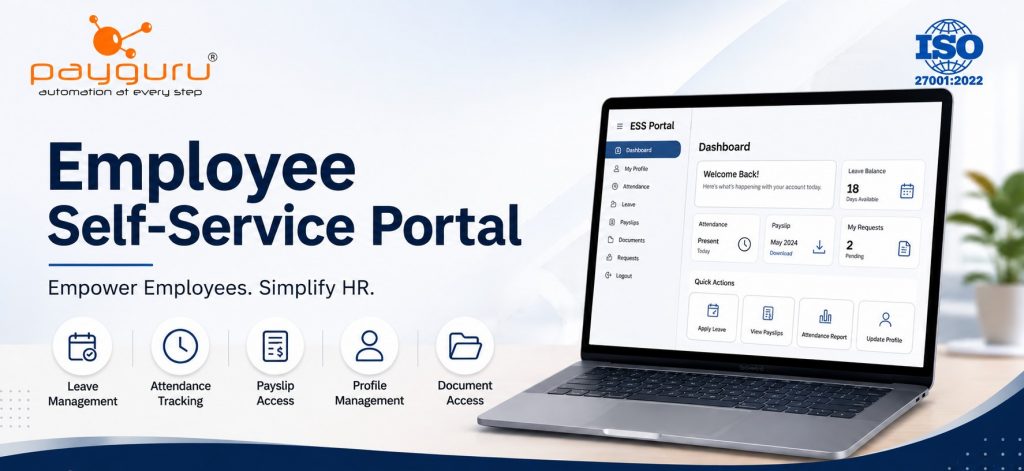
An Employee Self-Service (ESS) Portal is a digital platform that allows employees to manage routine HR-related activities without depending on HR staff for every request. Instead of emailing HR for a payslip, asking about leave balances, correcting attendance records, or updating personal information, employees can complete many of these tasks themselves through a centralized employee self-service portal.
An ESS portal is commonly integrated with an HRMS software, payroll software, attendance management system, and other workforce management tools. Depending on the organization and software, employees may be able to apply for leave, view attendance, download payslips, submit time corrections, check shift schedules, upload documents, and access company policies.
For businesses, the value of ESS goes beyond convenience. It can reduce repetitive administrative work, improve access to employee information, create clearer approval workflows, and give employees greater visibility into their HR records. Modern HR platforms such as PayGURU include self-service functionality as part of broader HR automation and workforce management capabilities.
An Employee Self-Service Portal, commonly called an ESS portal, is a secure web or mobile interface through which employees can access and manage selected HR information and processes.
In a traditional HR environment, employees may need to contact HR for routine requests. With an ESS portal, many of these activities can be handled directly by the employee and routed through predefined workflows.
For example, an employee who notices an incorrect attendance entry can submit a time correction request through the portal. A manager or authorized HR user can then review and approve the request according to company policy.
Similarly, employees may be able to:
The exact functionality depends on the organization’s HRMS software, configuration, employee roles, and approval policies.
An employee self-service system typically works as part of a larger HR technology ecosystem.
The basic process is straightforward:
For example, consider a leave application. An employee selects the required leave type, chooses the dates, enters any required information, and submits the request. The configured workflow can route it to the reporting manager. Once approved, the leave record and available balance can be updated in the HR system.
This type of workflow-based HR automation helps reduce manual communication and creates a more structured process.
A well-designed ESS portal for employees should provide useful functionality without making routine HR activities complicated.
Employees can view and, where permitted, update personal information such as contact details or other profile fields.
Organizations can configure which fields employees are allowed to modify and which require HR approval.
This helps maintain more accurate employee records while keeping sensitive information under appropriate administrative control.
An ESS portal can give employees visibility into their employee attendance, working hours, attendance status, and related records.
Depending on the integrated attendance system, employees may also be able to submit requests for:
PayGURU’s attendance solution, for example, provides employee self-service functions for leave applications, attendance validation, missing-punch or time-correction requests, shift schedules, and attendance reports.
Online leave management is one of the most common ESS features.
Employees can typically:
Managers can then process requests through configured approval workflows.
This approach can make leave management more transparent because employees do not need to rely entirely on emails, spreadsheets, or verbal communication.
Employees frequently need access to salary-related documents. An ESS portal can provide a secure location for employees to view or download their salary slips, payslips, and other authorized payroll documents.
PayGURU’s payroll software includes employee self-service capabilities that allow employees to download payslips and access reports such as loan statements and attendance-related records.
Providing direct access can reduce repetitive HR queries such as requests for previous payslips or salary documents.
An employee portal can also provide access to relevant HR documents.
Depending on organizational requirements, these may include:
Document access should always follow appropriate role-based permissions and organizational security policies.
Some ESS platforms allow employees to submit expense claims and reimbursement requests digitally.
An employee can enter the required details, attach supporting documents, and submit the claim for approval.
The system can then route the request to the appropriate manager or finance authority.
Employees working in organizations with multiple shifts can use the portal to view their shift schedules and related information.
This can be particularly useful for manufacturing, healthcare, retail, hospitality, security, logistics, and other operations where working schedules vary.
A useful HR self-service portal should not simply allow employees to submit requests. It should also provide visibility into request status.
Employees should be able to understand whether a request is:
This improves transparency and reduces the need for employees to repeatedly contact HR for status updates.
One of the biggest advantages of an ESS system is that employees can complete routine activities themselves.
Instead of HR staff repeatedly responding to requests for payslips, leave balances, attendance information, or basic employee records, the system can provide employees with direct access to permitted information.
This allows HR professionals to spend more time on activities that require human judgment and strategic attention.
Employees increasingly expect workplace processes to be convenient and accessible.
An employee self-service solution provides a central location where employees can manage common HR tasks without navigating multiple communication channels.
A well-configured portal can make routine processes easier, faster, and more transparent.
When employee information is maintained across emails, spreadsheets, and paper forms, inconsistencies can occur.
A centralized HRMS employee portal can provide a single system for managing employee information and related transactions.
Integrated HRMS and payroll systems can also synchronize employee information between HR and payroll processes, reducing duplicate data entry and inconsistencies.
Employees can see their attendance records, leave balances, submitted requests, and approval statuses based on the permissions configured by the organization.
This visibility can help reduce misunderstandings and make HR processes easier to follow.
Digital workflows can automatically route requests to the appropriate approver.
For example, a leave request can move from the employee to the reporting manager and then to HR when required.
This is generally more structured than managing approvals entirely through emails or physical forms.
As organizations grow, the number of HR transactions also increases.
An employee self-service platform can help businesses manage a growing volume of routine employee requests without requiring every transaction to be handled manually by HR.
PayGURU’s HRMS also supports centralized employee data, attendance and leave management, automated workflows, reporting, and employee self-service functionality.
The main difference between an ESS portal and a traditional HR process is how employees access and initiate routine services.
With traditional processes, an employee may send an email or visit the HR department to request a payslip, submit leave, report an attendance issue, or update information.
With an ESS portal, the employee can access the relevant function directly, submit the request digitally, and follow its status.
The traditional approach can work for smaller organizations, but it becomes increasingly difficult to manage when HR teams handle large numbers of employees and transactions.
The ESS approach creates a more structured process by combining employee access, data management, approvals, and recordkeeping within the HR system.
An employee self-service portal can be useful across many industries and workforce structures.
Employees can use ESS for leave applications, attendance records, payslips, personal information, and company documents.
Shift-based employees can access attendance records, shift schedules, leave functions, overtime requests, and related information.
Employees working across locations or rotating shifts can use self-service tools to view schedules and submit attendance or leave requests.
Hospitals and healthcare organizations can use employee portals to manage workforce information, schedules, attendance, leave, and documents.
Employees who work across locations can benefit from mobile-accessible HR services, subject to the organization’s attendance and security policies.
An ESS portal can improve HR operations, but implementation should be planned carefully.
Employee portals handle sensitive information. Organizations should consider authentication, authorization, access controls, data protection, backups, and other applicable security requirements.
Employees should only be able to access information they are authorized to view.
A portal is only useful if employees actually use it.
Organizations should provide clear onboarding, instructions, and support during implementation.
The ESS portal should work effectively with relevant HRMS, payroll, and attendance management software.
For example, if attendance information and payroll information are maintained separately, employees may see inconsistent records. Integration can help create a more consistent data flow.
Every organization has different approval structures.
Before implementation, businesses should define:
Clear workflows are essential for a smooth ESS experience.
Businesses should focus on usability, security, integration, and governance when implementing an employee self-service portal.
Begin with frequently requested activities such as leave, attendance, payslips, and employee profile information.
Once employees become comfortable with these functions, additional services can be introduced.
Employees should not need extensive technical knowledge to perform routine HR tasks.
Use clear labels, simple navigation, and straightforward workflows.
Not every employee should have access to the same information.
Use role-based permissions to control what employees, managers, HR teams, payroll users, and administrators can view or modify.
An ESS portal becomes more useful when connected with relevant HR processes.
For example, integration between attendance management, leave management, payroll, and employee records can reduce duplicate work and improve consistency.
After deployment, monitor which features employees use and where they encounter difficulties.
Employee feedback can help organizations improve workflows, training, and portal usability.
Before selecting an employee self-service software, businesses should evaluate the following:
PayGURU’s HRMS combines employee data management with attendance, leave, payroll readiness, workflows, reporting, and an employee self-service portal, making ESS part of a broader HR management environment rather than an isolated tool.
An Employee Self-Service Portal is a digital HR platform that allows employees to access and manage permitted HR information and services themselves. Common functions include leave applications, attendance records, payslips, employee information, documents, and request tracking.
Depending on the software, employees can apply for leave, view attendance, request time corrections, check shift schedules, download payslips, access documents, update selected personal information, submit claims, and track approval requests.
Yes, an ESS portal is commonly provided as a module or feature within HRMS software. It connects employee-facing services with broader HR processes such as attendance, leave management, payroll, employee records, and workflows.
ESS reduces workload by allowing employees to handle routine requests themselves. Instead of HR manually providing every payslip, checking every leave balance, or processing every basic information request, employees can access available services directly through the portal.
Yes. Employee self-service software for small businesses can help centralize employee records, leave, attendance, payslips, and routine requests. The appropriate level of functionality depends on workforce size, HR processes, budget, and operational requirements.
Yes, many modern HRMS and ESS platforms can integrate employee self-service functions with attendance and payroll processes. Integration can help synchronize relevant employee information and reduce duplicate data entry.
Security depends on the software architecture and how the organization configures and manages it. Businesses should evaluate authentication, role-based access, encryption, backups, audit capabilities, data protection practices, and other relevant security controls before implementation.
An Employee Self-Service Portal transforms routine HR interactions by giving employees direct access to services and information they are authorized to manage. From leave applications and attendance corrections to payslip downloads and employee information, ESS can make everyday HR processes more accessible and structured.
For businesses, the objective should not simply be to digitize existing paperwork. A well-designed ESS system should connect employee services with HRMS, attendance, payroll, and approval workflows while maintaining appropriate security and access controls.
As workforce operations become increasingly digital, an ESS portal can serve as an important component of a modern HR management system, helping employees manage routine tasks while allowing HR teams to focus on higher-value responsibilities.
If your organization is looking to streamline employee self-service, attendance, leave, payroll, and broader HR operations, explore PayGURU’s HRMS and workforce management solutions or contact PayGURU for a consultation.