Introduction HRMS software for small businesses in India helps organizations manage employee information, payroll, attendance,
 By Pay GURU
June 29, 2026
By Pay GURU
June 29, 2026
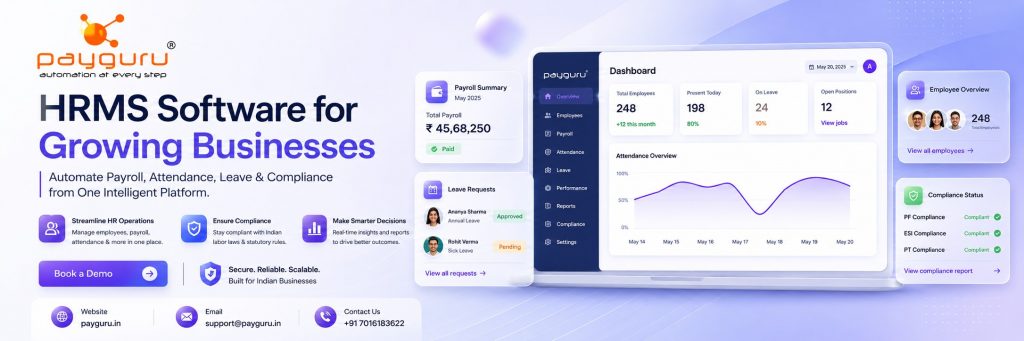
HRMS software for small businesses in India helps organizations manage employee information, payroll, attendance, leave, compliance, recruitment, and performance from a centralized platform. As businesses grow, manual HR processes often become time-consuming, error-prone, and difficult to scale. A Human Resource Management System (HRMS) simplifies these operations, improves accuracy, and enables business owners to focus on growth rather than administrative tasks.
For small businesses, HRMS software is no longer a luxury reserved for large enterprises. Cloud-based solutions have made advanced HR technology affordable and accessible to startups, SMEs, retail businesses, manufacturing units, educational institutions, healthcare providers, and service companies. From tracking employee attendance to ensuring statutory compliance, HRMS software can significantly improve workforce management and operational efficiency.
If you are exploring a practical HR automation solution, you can learn more about modern workforce tools on PayGuru and review its dedicated HRMS software page.
This guide explains how HRMS software works, its benefits, essential features, implementation considerations, and how small businesses in India can choose the right solution for their needs.
HRMS stands for Human Resource Management System. It is a software platform designed to automate and streamline human resource functions within an organization.
An HRMS typically combines several HR processes into a single system, including:
Instead of maintaining multiple spreadsheets and manual records, businesses can manage their workforce through one centralized platform. A solution like PayGuru HRMS can help small businesses simplify these tasks while improving visibility and control.
Many small businesses begin with manual HR processes. While this approach may work for a handful of employees, challenges increase as the workforce grows.
Common HR challenges faced by small businesses include:
HRMS software addresses these challenges by automating repetitive tasks and providing accurate real-time information. If your business is ready to move away from manual HR operations, you can explore PayGuru for a more streamlined approach to workforce management.
Reduced Administrative Work
Automation eliminates manual data entry, repetitive calculations, and paperwork.
Improved Payroll Accuracy
Integrated payroll systems reduce calculation errors related to salaries, deductions, overtime, and taxes.
Better Compliance Management
Businesses can manage statutory requirements such as PF, ESI, professional tax, and labor regulations more effectively.
Enhanced Employee Experience
Employees can access payslips, apply for leave, update information, and track attendance through self-service portals.
Scalability
An HRMS can support business growth without requiring significant increases in HR administration resources.
For businesses looking for a scalable HR solution, the PayGuru HRMS platform is a useful place to start.
A centralized employee database stores:
This ensures quick access to accurate employee data. A well-structured HRMS from PayGuru can help keep employee records organized and easy to manage.
Payroll is one of the most important HR functions.
A payroll module typically includes:
Automated payroll reduces processing time and improves accuracy. To understand how payroll automation fits into a broader HR workflow, visit the PayGuru HRMS page.
Attendance tracking helps businesses monitor employee working hours efficiently.
Features often include:
Attendance automation is especially valuable for growing teams, and you can explore related workforce management capabilities on PayGuru.
Employees can apply for leave online while managers can review and approve requests.
Benefits include:
A digital leave workflow helps HR teams save time and gives employees a smoother experience. Learn more about integrated HR workflows through PayGuru HRMS.
Employee self-service functionality empowers staff to:
This reduces dependency on HR teams and improves convenience for employees. A self-service portal is one of the most practical features offered by modern HR platforms such as PayGuru.
Many HRMS platforms include hiring tools that help businesses:
A structured onboarding process improves employee experience from day one. If your business wants to streamline hiring and onboarding, the PayGuru HRMS solution is worth reviewing.
Performance management modules support:
This helps align employee performance with business objectives. A connected HR system makes it easier to track progress and review outcomes in one place.
Reporting tools provide valuable workforce insights.
Examples include:
Data-driven decision-making becomes easier with real-time analytics. For businesses that want better visibility into workforce trends, PayGuru offers a practical starting point.
| Feature | Manual HR Management | HRMS Software |
|---|---|---|
| Employee Records | Paper files and spreadsheets | Centralized digital database |
| Payroll Processing | Manual calculations | Automated processing |
| Attendance Tracking | Registers and spreadsheets | Real-time tracking |
| Leave Management | Manual approvals | Automated workflows |
| Compliance Monitoring | High risk of errors | Better compliance support |
| Reporting | Time-consuming | Instant reports |
| Scalability | Limited | Highly scalable |
| Employee Access | HR dependent | Self-service portal |
The difference becomes even more noticeable as the business grows. A platform like PayGuru HRMS can help small businesses move from manual administration to efficient digital operations.
Automation allows HR teams and business owners to spend less time on administrative tasks and more time on strategic activities.
Cloud-based HRMS platforms enable employees and managers to access information from anywhere.
Real-time reports help leaders understand workforce trends and make informed decisions.
Maintaining accurate employee records and payroll documentation helps reduce compliance-related risks.
A positive employee experience can contribute to higher engagement and retention rates.
If your organization is planning for growth, exploring PayGuru can help you understand how HR automation supports long-term scalability.
Small businesses across various sectors can benefit from HRMS implementation.
No matter the industry, a flexible HR platform such as PayGuru HRMS can help simplify workforce operations.
Selecting the right HRMS is critical for long-term success.
The software should be intuitive for both HR teams and employees.
Cloud deployment offers flexibility, remote access, and reduced infrastructure costs.
Ensure payroll functionality supports Indian salary structures and statutory requirements.
Choose software that can grow alongside your business.
Employee data must be protected through strong security measures and access controls.
Different businesses have unique workflows. Customizable features provide greater flexibility.
Reliable implementation and support services can significantly improve adoption and long-term success.
Mobile apps improve convenience for employees and managers.
If you want to evaluate these factors in a real-world solution, visit PayGuru and review its HRMS capabilities.
Although HRMS software offers many benefits, businesses may encounter implementation challenges.
Employees may initially resist adopting new technology.
Solution: Provide training and communicate benefits clearly.
Transferring employee data from spreadsheets and legacy systems can be complex.
Solution: Conduct thorough data validation before migration.
Lack of user training can limit software adoption.
Solution: Offer role-based training sessions and ongoing support.
Some businesses pay for advanced features they rarely use.
Solution: Focus on current requirements while allowing room for future growth.
A practical implementation plan and the right vendor can make adoption much smoother. For more information, you can explore PayGuru HRMS.
To maximize return on investment, small businesses should:
Following these practices helps ensure smooth implementation and long-term value. Businesses that want to modernize HR operations can begin by reviewing PayGuru and its HRMS offering.
The HR technology landscape continues to evolve.
Emerging trends include:
Small businesses that embrace modern HR technology can improve efficiency and remain competitive in a rapidly changing business environment. A future-ready platform like PayGuru HRMS can help businesses stay aligned with these trends.
HRMS software is a digital platform that helps organizations manage employee data, payroll, attendance, leave, compliance, and other HR functions from a centralized system. You can explore a practical example on PayGuru.
Yes. Modern cloud-based HRMS solutions are designed to be affordable, scalable, and easy to use for small businesses and startups. Many growing businesses begin their search with PayGuru.
HRMS software automates salary calculations, deductions, reimbursements, and statutory compliance, reducing the risk of manual errors.
Many HRMS platforms support integration with biometric attendance systems, enabling automated attendance tracking.
Employee self-service allows staff to access payslips, apply for leave, update personal information, and reduce dependence on HR teams.
Most reputable HRMS providers implement security measures such as encryption, role-based access controls, and regular backups.
Yes. Many HRMS solutions support compliance-related processes including PF, ESI, professional tax, and payroll documentation.
Implementation timelines vary depending on business size, data complexity, and customization requirements.
Key considerations include ease of use, payroll functionality, scalability, security, mobile access, reporting capabilities, and customer support.
Yes. Cloud-based HRMS platforms allow employees and managers to access HR functions from any location with internet connectivity.
HRMS software has become an essential business tool for small businesses in India seeking to improve efficiency, reduce administrative workload, enhance employee experience, and maintain compliance. By automating core HR functions such as payroll, attendance, leave management, and employee record keeping, businesses can streamline operations and focus on growth.
The right HRMS solution should align with your organization’s current needs while providing the flexibility to support future expansion. Careful evaluation of features, usability, scalability, and support services can help businesses make a confident investment in their workforce management strategy.
If you are ready to simplify HR operations and improve workforce management, explore PayGuru and its dedicated HRMS software solution. A modern HRMS can help your business automate processes, improve employee engagement, and support sustainable growth.