Managing employee time accurately is a fundamental part of running an efficient organization. When attendance is tracked through

 By Pay GURU
August 13, 2026
By Pay GURU
August 13, 2026
Managing employee time accurately is a fundamental part of running an efficient organization. When attendance is tracked through paper registers, spreadsheets, disconnected systems, or manual timesheets, HR teams can spend considerable effort collecting information, correcting records, resolving attendance disputes, and preparing data for payroll.
A Time and Attendance System provides a more structured approach. It digitally records employee attendance, working hours, shifts, overtime, leave, and related workforce information. Depending on the organization’s requirements, attendance can be captured through biometric attendance systems, fingerprint devices, face recognition, RFID, cards, or other connected methods.
The real value goes beyond simply recording when employees arrive and leave. Accurate attendance data can help organizations improve workforce visibility, simplify administrative processes, support payroll accuracy, strengthen accountability, and make better staffing decisions. When integrated with HRMS software, payroll software, and workforce management processes, a time and attendance solution can become an important part of an organization’s operational infrastructure.
This article explains how a Time and Attendance System improves workforce productivity, what features businesses should consider, common challenges, practical use cases, and best practices for successful implementation.
A Time and Attendance System is a digital solution used to record, monitor, and manage employee working time. It can capture attendance data, calculate working hours, manage shifts, record overtime, track absences, and provide reports for HR and management.
Modern attendance management systems can connect attendance devices with centralized software. This allows organizations to collect attendance information automatically instead of relying entirely on manual data entry.
Typical capabilities include:
For businesses with multiple departments, shifts, or locations, centralized attendance management can make workforce administration considerably easier.
A Time and Attendance System improves workforce productivity primarily by reducing administrative effort, improving visibility, and giving organizations more reliable workforce data.
Here are the key ways it contributes to better productivity.
Manual attendance processes require HR employees to collect records, verify information, calculate hours, and correct discrepancies.
A digital employee attendance system automates much of this process.
For example, when an employee records attendance through an integrated biometric device, the information can be transferred to the attendance platform. HR teams can then review the data instead of manually entering every attendance record.
This allows HR professionals to spend less time on repetitive administrative activities and more time on workforce planning, employee engagement, compliance, and other strategic responsibilities.
Accurate attendance data is important for both workforce management and payroll processing.
Manual records can contain issues such as:
A properly configured automated attendance system can apply predefined attendance rules consistently.
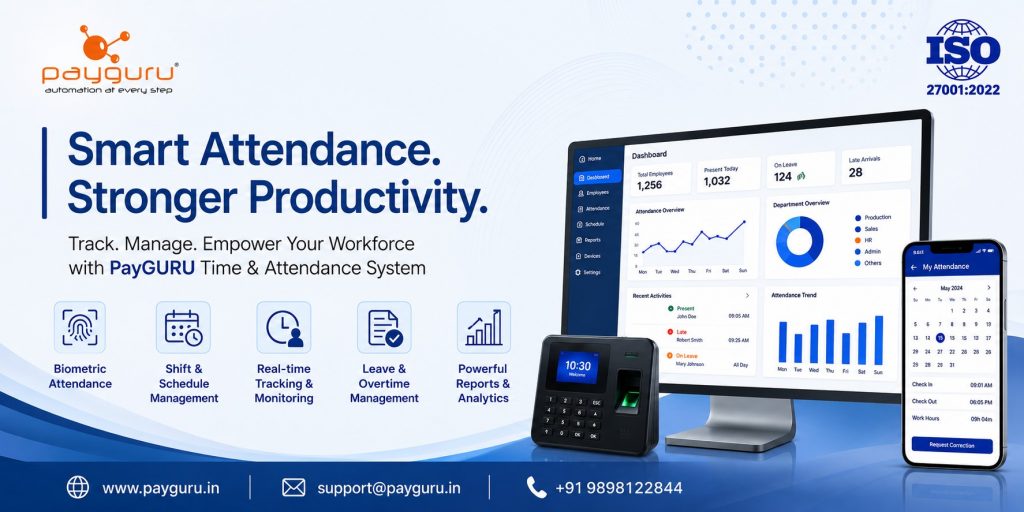
For organizations using biometric attendance, employee identity can also be verified through methods such as fingerprint or facial recognition. PayGURU’s Time and Attendance solution supports biometric integration, real-time attendance tracking, shift management, leave management, overtime tracking, and employee self-service features.
Managers need to know whether employees are available, absent, late, working remotely, or assigned to a particular shift.
A centralized workforce management system can provide a clearer view of attendance information.
For example, a manager may need to determine:
Having this information readily available can support faster operational decisions.
Organizations in manufacturing, healthcare, logistics, retail, hospitality, security, and other industries often operate multiple shifts.
Managing these schedules manually can become complicated, particularly when employees change shifts, work overtime, take leave, or have different working-hour rules.
A shift management system can help organizations configure employee schedules and monitor attendance against those schedules.
For example, a manufacturing company may have:
The system can associate employees with the appropriate schedules and provide attendance records according to the configured rules.
Overtime needs to be tracked carefully because it can affect payroll, workforce costs, and compliance requirements.
An attendance management system can record overtime based on configured organizational policies and workflows.
Instead of relying on separate spreadsheets, HR teams can review overtime information alongside attendance records.
This creates a more consistent process for:
Organizations should still configure their systems according to applicable employment policies and legal requirements.
Attendance and payroll are closely connected.
Working hours, overtime, leave, absences, and other attendance information may influence salary calculations depending on company policies.
When attendance data is transferred directly into payroll software, HR teams can reduce duplicate data entry and improve consistency between attendance records and payroll records.
PayGURU provides payroll and attendance capabilities designed to work together, including employee self-service, attendance validation, leave workflows, overtime processes, and reporting.
This type of integration can help create a smoother workflow:
Attendance Capture → Attendance Validation → Leave and Overtime Approval → Payroll Processing → Reporting
The exact workflow should depend on the organization’s policies and payroll structure.
Productivity is not only about management efficiency. Employees also benefit when attendance information is transparent and accessible.
An employee self-service portal can allow employees to:
PayGURU’s attendance solution includes employee self-service capabilities for attendance validation, leave applications, missing punch requests, shift schedules, and attendance reports.
When employees can see their own records, simple attendance queries can often be handled through established workflows rather than repeated manual communication with HR.
Attendance data can provide useful operational insights when analyzed over time.
Management may identify patterns such as:
The objective should not simply be to monitor employees. The data should help management understand operational problems.
For example, consistently high overtime in one department could indicate insufficient staffing, unrealistic schedules, seasonal demand, or inefficient workforce allocation.
This makes attendance analytics useful for workforce planning.
Managing attendance becomes more challenging when an organization has multiple offices, factories, branches, or project locations.
A centralized cloud-based attendance system can help organizations maintain attendance information across different locations, subject to connectivity, device, and system configuration.
PayGURU’s platform supports multiple companies and locations, along with synchronization between biometric devices and software.
This can provide HR teams with a more centralized approach to workforce administration.
Attendance discrepancies are common in organizations that rely heavily on manual processes.
An employee may report that:
A digital system can provide records and workflow-based correction processes.
Instead of relying entirely on emails, messages, or paper forms, employees can submit correction requests through defined processes. HR or authorized managers can then review and approve those requests.
This creates greater consistency and traceability.
Manual attendance and automated attendance serve the same basic purpose, but their operational characteristics are different.
With manual attendance tracking, employees or supervisors record attendance using registers, spreadsheets, or standalone timesheets. HR teams then consolidate the information and calculate working hours.
With an automated attendance system, attendance is captured digitally and can be processed according to predefined rules. The information can then be connected with leave management, payroll, reporting, and other HR processes.
The difference becomes especially important as an organization grows.
A small team may initially manage attendance through spreadsheets. However, organizations with multiple shifts, departments, locations, or hundreds of employees may need a more centralized and automated approach.
A Time and Attendance System can support different workforce environments.
Factories often have multiple shifts, production teams, contractors, and overtime requirements. Automated attendance can help HR track shift attendance and working hours more systematically.
Office-based organizations can use attendance software to manage working hours, leave, flexible schedules, and employee self-service.
Retail businesses may operate across multiple branches with different staffing schedules. Centralized attendance information can help managers monitor staffing and attendance.
Hospitals and healthcare organizations often operate around the clock. Shift-based attendance management can help maintain accurate records for different employee groups.
Organizations managing distributed or contract workforces may require structured methods to track attendance across locations and projects.
Shift schedules, extended working hours, and distributed employees make reliable attendance information important for workforce planning.
Choosing the right platform requires more than checking whether it can record clock-in and clock-out times.
Businesses should evaluate the complete workforce workflow.
Consider support for fingerprint, facial recognition, RFID, and compatible attendance devices if biometric attendance is appropriate for the organization.
Real-time or near-real-time attendance visibility can help managers respond more quickly to attendance exceptions and staffing issues.
The system should support the organization’s actual shift structures, including rotational schedules and different employee categories.
Attendance should connect logically with leave and overtime workflows rather than functioning as an isolated tool.
Employees should be able to view relevant records and submit requests without requiring HR to perform every action manually.
Look for configurable reports that help HR and management understand attendance, overtime, absenteeism, shifts, and exceptions.
PayGURU states that its attendance platform provides extensive reporting capabilities, dashboards, multiple export formats, scheduled reports, and support for multiple languages.
Integration with HRMS software and payroll management software can reduce duplicate data entry and create a more connected workforce management process.
Technology alone does not guarantee better productivity. Implementation quality matters.
If attendance rules are unclear, software configuration can produce inconsistent results.
Organizations should define policies for:
Employees and managers should understand how to use the system and how to submit corrections or requests.
Biometric devices, networks, and software integrations should be tested before full deployment.
Attendance records are employee data. Organizations should establish appropriate access controls, security practices, retention policies, and compliance procedures.
Automation should support HR teams rather than eliminate necessary review. Exceptions, unusual attendance patterns, and correction requests may still require authorized human decisions.
Businesses can get better results from a Time and Attendance System by following a structured implementation approach.
Identify the number of employees, locations, shifts, attendance policies, payroll requirements, and integration needs.
Document policies before configuring the software.
Where appropriate, connect approved attendance data with payroll processing to minimize duplicate work.
Allow employees to review their records and submit requests through controlled workflows.
Managers should focus on meaningful exceptions such as repeated absenteeism, unusual overtime, and staffing gaps.
Attendance data becomes more valuable when it is regularly reviewed and used for workforce planning.
Use role-based access, secure authentication, appropriate backups, and clear data governance practices.
Organizations should measure whether the system is actually improving operations.
Useful indicators include:
The purpose of measurement is not simply to prove that software was installed. It is to determine whether the organization is achieving measurable process improvements.
A Time and Attendance System is software and, where applicable, connected hardware used to record employee attendance, working hours, shifts, leave, overtime, and related workforce information.
It can improve productivity by reducing manual HR work, providing better attendance visibility, simplifying shift management, reducing repetitive administrative tasks, and giving managers reliable workforce information for planning.
Biometric attendance can provide automated identity verification and reduce dependence on manual attendance records. However, the right method depends on organizational requirements, employee policies, infrastructure, privacy considerations, and operating conditions.
Yes. Many modern attendance management systems can integrate with payroll software so approved attendance, leave, and overtime information can contribute to payroll processing.
Yes. Modern systems can support different shift schedules, employee groups, locations, and attendance rules, depending on the capabilities of the selected platform.
Many systems provide employee self-service, allowing employees to view attendance records, check schedules, apply for leave, and request corrections through defined workflows.
Businesses should evaluate biometric and device compatibility, shift management, leave and overtime workflows, employee self-service, reporting, payroll integration, scalability, security, support, and compatibility with their existing HR processes.
Yes. Small businesses can also benefit from automated attendance management, particularly when manual processes are becoming difficult to maintain. The system should be appropriately scaled to the organization’s workforce and operational needs.
A Time and Attendance System is more than a digital replacement for an attendance register. When properly implemented, it can connect attendance capture with shift management, leave management, overtime tracking, employee self-service, HRMS, and payroll processing.
The biggest productivity benefit comes from creating a reliable flow of workforce information. HR teams spend less time gathering and reconciling routine records, employees gain greater visibility into their attendance, and managers gain better information for staffing and operational decisions.
For businesses evaluating an attendance management system, the priority should be choosing a solution that fits their workforce structure, attendance policies, technology environment, and future growth requirements.
PayGURU provides Time and Attendance, biometric attendance, payroll, HRMS, and workforce management solutions designed to help organizations automate and manage workforce operations.
To explore the solution and discuss your organization’s requirements, visit PayGURU.