Managing employee working hours accurately is a fundamental part of effective workforce management. Yet many businesses still

 By Pay GURU
August 12, 2026
By Pay GURU
August 12, 2026
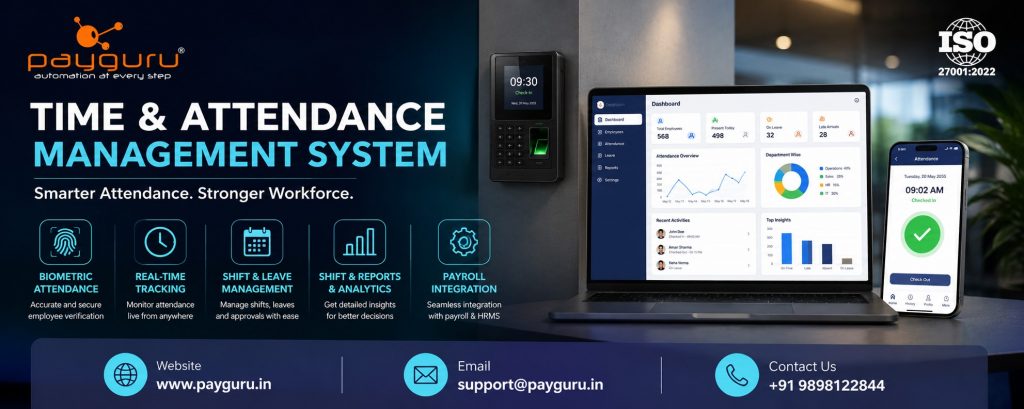
Managing employee working hours accurately is a fundamental part of effective workforce management. Yet many businesses still rely on spreadsheets, paper registers, manual timesheets, or disconnected attendance devices. These approaches can make it difficult to track employee attendance, working hours, shifts, overtime, late arrivals, and absences consistently.
A Time and Attendance Management System is a digital solution designed to record, monitor, and manage employee time and attendance through a centralized platform. Depending on the organization’s requirements, employees may record attendance using biometric devices, facial recognition, RFID cards, mobile applications, web-based systems, or other authorized methods.
The system can automatically capture attendance data, calculate working hours, apply organizational rules, generate reports, and provide information that can be used by HR and payroll teams. Modern attendance management software can also integrate with HRMS software, payroll software, leave management, and workforce management processes.
For businesses, the objective is not simply to record when employees enter and leave. A well-designed time and attendance system helps create a reliable process for managing workforce time, improving visibility, reducing repetitive administrative work, and supporting accurate payroll processing.
A Time and Attendance Management System is software that electronically records and manages employee attendance, working hours, shifts, breaks, leave, overtime, late arrivals, early departures, and absences.
Instead of manually maintaining attendance registers or spreadsheets, businesses can use a centralized attendance management system to collect attendance information and apply predefined rules.
For example, an organization may configure:
The system can then process attendance records according to those rules and generate useful information for HR, managers, payroll teams, and authorized employees.
PayGURU, for example, describes its Time Attendance solution as a way to track employee hours, support workforce management, and provide real-time tracking.
A typical employee attendance management system follows a relatively straightforward process.
First, the system identifies an employee using an authorized attendance method. Common options include:
The appropriate method depends on workplace requirements, security considerations, employee locations, and company policies.
When an employee records a punch or attendance event, the system captures relevant information such as:
Modern systems can synchronize attendance information with a central application. PayGURU’s HRMS offering, for instance, supports integration with biometric, face recognition, and RFID devices, along with real-time attendance information.
The software processes the captured records according to configured business rules.
It may determine:
This reduces the need for HR teams to manually calculate every employee’s working time.
HR managers and authorized supervisors can review attendance information through dashboards and reports.
Reports may include:
Attendance data can also be connected to payroll management software.
For example, approved attendance information can contribute to calculations involving working days, unpaid leave, overtime, or other payroll-related rules, depending on the organization’s configuration.
This is particularly useful when attendance and payroll software operate as integrated components of an HR technology environment.
The exact features vary between platforms, but businesses should evaluate the following capabilities.
A biometric attendance system can use fingerprint or facial recognition technology to identify employees. This can provide a structured alternative to paper registers and manual attendance entry.
Real-time attendance tracking allows authorized users to view attendance information as it becomes available from connected devices or applications.
This can be particularly useful for organizations with large teams or multiple operating locations.
Businesses with rotating, fixed, or multiple shifts need flexible employee shift management.
A capable system should support:
Attendance and leave are closely connected. A complete system may allow employees to submit leave requests while managers or HR teams review and approve them.
PayGURU’s HRMS information includes attendance and leave management, including leave workflows and real-time attendance logs.
Organizations that pay or monitor overtime need a reliable way to identify additional working hours.
The system can help HR teams review overtime records based on configured rules and approval processes.
Employees may occasionally have legitimate reasons for missing a punch or recording incorrect attendance.
An attendance regularization feature can allow employees or supervisors to submit corrections for review instead of modifying records informally.
An employee self-service portal can allow employees to view attendance information, check working hours, submit leave requests, or request attendance corrections, depending on system capabilities.
Reports help managers understand attendance patterns and identify issues requiring attention.
Useful reports include:
Businesses operating across multiple offices, factories, branches, or project locations may require multi-location attendance management.
A centralized system can make it easier to manage workforce information across locations while maintaining appropriate access controls.
Implementing an automated attendance management system can provide several operational benefits.
Manual attendance requires HR personnel to collect, verify, calculate, and consolidate information.
Automation can reduce repetitive data entry and make attendance processing more systematic.
When attendance is captured electronically and processed according to predefined rules, businesses can reduce some of the inconsistencies associated with manual record keeping.
However, technology does not eliminate every error. Device connectivity, incorrect configuration, missing punches, and inaccurate employee information can still affect results.
Managers can gain a clearer view of attendance, absences, shifts, and working hours.
This information can support operational planning and help managers respond to attendance-related issues more quickly.
Attendance is often an important input for payroll.
Integrating time tracking, attendance management, and payroll software can reduce duplicate data entry and help payroll teams work from consistent employee information.
PayGURU’s payroll platform includes salary processing capabilities and can work alongside attendance-related processes as part of a broader HR technology environment.
Attendance information becomes more useful when connected with other HR processes such as:
This creates a more connected approach to workforce management.
Digital records can make it easier for authorized HR users to search, filter, analyze, and report attendance information compared with scattered paper records or multiple spreadsheets.
The biggest difference between manual and automated attendance is how attendance data is collected, processed, and reviewed.
With a manual process, employees may sign a register or submit timesheets. HR staff then verify the information, calculate working hours, identify absences, and prepare data for payroll.
With a digital time and attendance system, attendance can be captured electronically and processed according to configured rules. Reports can then be generated from the centralized system.
Manual attendance may still be appropriate for very small teams with simple working arrangements. However, as the workforce becomes larger, more distributed, or shift-based, automated attendance tracking software can become more practical.
A time and attendance management system for businesses can be useful across many industries.
Factories often have multiple shifts, production schedules, overtime requirements, and large workforces. Automated attendance can help HR teams manage these processes more systematically.
Office-based organizations can use attendance software to manage working hours, leave, shifts, and employee attendance records.
Businesses with branch locations and varying employee schedules can benefit from centralized attendance and shift management.
Hospitals and healthcare organizations may need to manage complex schedules, shifts, and workforce availability.
Organizations operating across project sites can use suitable attendance technologies to track employees working at different locations.
Organizations managing contractors or temporary workers may require attendance information alongside worker records, compliance processes, and payroll or billing workflows.
PayGURU also provides Contract Labour Management, with capabilities covering worker onboarding, attendance, and compliance-related processes.
Technology can simplify attendance management, but implementation requires careful planning.
If working hours, shifts, grace periods, holidays, or overtime rules are configured incorrectly, the resulting reports may also be inaccurate.
Biometric devices and other attendance terminals depend on proper installation, configuration, and data synchronization.
Businesses should establish procedures for handling device failures and missing attendance records.
Employees need to understand how and when to record attendance, how correction requests work, and which policies apply to them.
Attendance information is employee-related data. Businesses should apply appropriate access controls, authentication practices, data protection measures, and retention policies.
If attendance software does not integrate effectively with HRMS or payroll systems, HR teams may continue performing manual data transfers.
This is why integration should be considered before selecting a solution.
Before purchasing or implementing attendance management software, decision-makers should evaluate the system against actual business requirements.
Consider the following:
Businesses should avoid selecting a system solely because it has the largest number of features. The better approach is to identify operational requirements first and then assess whether the software addresses them.
Successful attendance management depends on both technology and clear policies.
Employees should understand working hours, shifts, grace periods, overtime rules, leave procedures, and attendance correction processes.
Use consistent procedures across departments wherever possible. If different locations require different rules, document those variations clearly.
Connecting attendance management software, HRMS, and payroll management can reduce duplicate work and improve data consistency.
HR teams should monitor missing punches, unusual attendance patterns, excessive overtime, and unresolved correction requests.
Restrict attendance information to authorized users and follow applicable organizational and legal requirements for data protection.
A Time and Attendance Management System is software that records and manages employee attendance, working hours, shifts, leave, overtime, late arrivals, absences, and related attendance information.
The system captures employee attendance through methods such as biometric devices, facial recognition, RFID, mobile applications, or web-based tools. It then processes the information according to configured rules and generates attendance records and reports.
Attendance software primarily manages employee time, attendance, shifts, leave, and working hours. Payroll software focuses on salary calculations, deductions, reimbursements, payslips, and applicable payroll processes. Integrating the two can allow attendance information to support payroll processing.
Biometric attendance can provide an automated method of identifying employees and recording attendance. Whether it is appropriate depends on factors such as workforce size, workplace requirements, privacy considerations, infrastructure, and organizational policies.
Yes. Many modern attendance management systems support multiple shifts, shift assignments, weekly offs, holidays, and different working schedules. The exact capabilities depend on the software.
Yes. Attendance is commonly integrated with HRMS software so employee information, attendance, leave, workforce management, and other HR processes can work together within a connected system.
Attendance can affect payroll-related inputs such as working days, unpaid leave, overtime, or other configured rules. Integration can reduce duplicate data entry and help HR and payroll teams work with consistent information.
A Time and Attendance Management System is more than a digital replacement for an attendance register. It provides businesses with a structured way to capture employee attendance, manage working hours, administer shifts, monitor exceptions, generate reports, and connect workforce information with broader HR and payroll processes.
The right solution should match the organization’s workforce structure, attendance policies, operating locations, technology environment, and reporting requirements. Businesses should also consider integration with HRMS software, payroll management software, and attendance hardware when evaluating long-term requirements.
For organizations looking to modernize workforce operations, an integrated approach can make attendance information more useful across HR and payroll processes.
To explore solutions for time and attendance management, HRMS, payroll, and workforce management, visit PayGURU or explore its Time Attendance solution. You can also review its HRMS solution and Payroll solution to understand how attendance can fit into a broader HR technology ecosystem.