Introduction A leave management system in HRMS software is a digital solution that helps organizations manage employee leave

 By Pay GURU
September 05, 2026
By Pay GURU
September 05, 2026
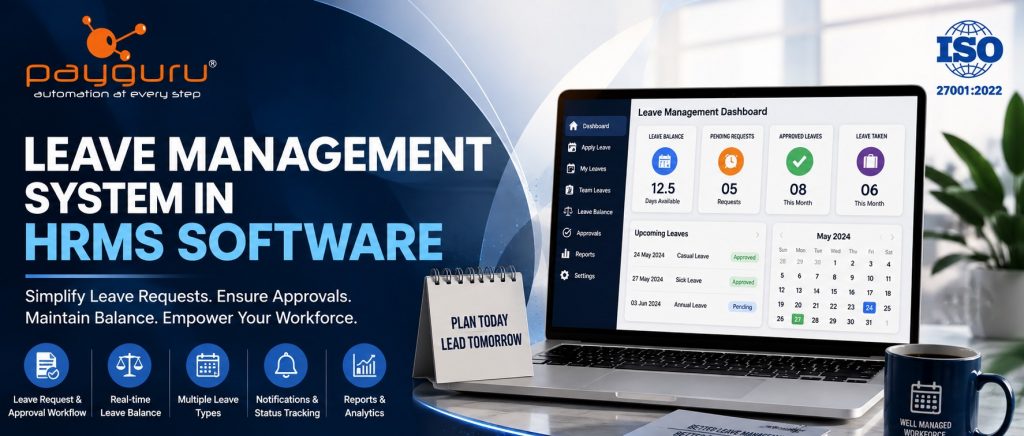
A leave management system in HRMS software is a digital solution that helps organizations manage employee leave requests, approvals, leave balances, holidays, attendance records, and related HR policies from a centralized platform. Instead of relying on emails, spreadsheets, paper forms, or separate approval records, an integrated system creates a structured workflow for employees, managers, and HR teams.
For growing organizations, effective leave administration is important because employee absence can affect attendance records, workforce planning, payroll inputs, and day to day operations. A well configured HRMS leave management module connects these processes so that approved leave is recorded consistently and is visible to the right people.
Modern HRMS platforms can also support employee self service, role based approvals, configurable leave rules, holiday calendars, reporting, and integration with attendance and payroll processes. PayGURU’s HRMS provides functionality covering employee management, attendance, leave applications, approval workflows, reporting, and workforce tracking.
A leave management system in HRMS software is a module used to create, administer, approve, track, and report employee leave. It replaces fragmented leave registers and manual approval processes with a centralized digital workflow.
Depending on the organization and software configuration, an employee leave management system can handle:
The exact functionality varies by platform. PayGURU’s HRMS information includes leave application and approval workflows, absentee tracking, and reporting related to leave balances and workforce information.
A digital leave management software workflow generally follows a simple sequence.
The employee selects the relevant leave type, dates, and other required information through the HRMS. Depending on the configuration, the system can show available leave balances before the request is submitted.
The HRMS leave management module can apply organizational rules such as eligibility, available balance, leave type, holidays, weekends, or approval requirements. The rules should reflect the company’s documented leave policy and applicable requirements.
The request is routed to the appropriate manager, HR representative, or other authorized approver. Role based approval workflows help organizations maintain a clear approval structure.
Once the authorized person approves or rejects the request, the decision is stored in the system. Employees can view the status instead of repeatedly contacting HR.
After approval, the employee’s leave balance can be updated according to the configured policy. This gives HR and employees a more consistent view of available leave.
Approved leave can be reflected in attendance records, helping HR distinguish authorized leave from unplanned absenteeism. This is particularly useful when attendance and leave management are handled within the same HRMS.
Where the HRMS and payroll processes are integrated, approved leave data can become part of the payroll input process. Payroll treatment depends on the organization’s salary structure, leave policy, applicable rules, and system configuration.
A strong leave approval workflow removes uncertainty from the request process. Employees submit requests digitally, managers receive them through a defined approval path, and HR can monitor exceptions or pending requests.
For organizations with multiple departments or locations, workflow rules can be configured so that the appropriate authority reviews each request. PayGURU describes role based workflow approvals and a maker checker approach for critical HR processes.
Manual leave registers can become difficult to maintain when employees use different leave categories. A digital leave balance management feature can maintain records of opening balances, leave taken, pending requests, and available balances according to configured rules.
This can also help reduce routine HR queries such as:
Organizations may have different leave categories based on their policies. An HRMS leave system should allow administrators to configure relevant leave types and eligibility rules rather than forcing every employee into one generic category.
Examples can include annual leave, sick leave, casual leave, earned leave, or other categories defined by the organization’s policy.
A holiday calendar helps the system determine how approved leave dates interact with designated holidays and weekly offs. Multi location organizations may require different holiday calendars for different branches, states, departments, or employee groups.
An employee self service portal allows employees to manage routine HR activities without depending entirely on HR staff. PayGURU’s payroll and HRMS information states that employees can apply for leaves, check attendance, request missing punch or time corrections, and access other HR related information through self service functions.
Digital notifications can help employees and managers know when an application is submitted, approved, rejected, or awaiting action. Status visibility is especially useful for organizations where HR teams handle large numbers of requests.
A centralized leave tracking system can generate reports based on employee, department, location, leave type, or period. Common reports include leave taken, leave balance, pending requests, absenteeism, and attendance related summaries.
For organizations looking to understand how HR technology can centralize employee processes, the HRMS software resources from PayGURU provide additional context on HR automation and workforce management.
The value of employee leave management is not simply faster approval. The larger benefit comes from connecting leave with the organization’s wider HR processes.
Manual leave administration often requires HR teams to collect requests, verify balances, update spreadsheets, inform managers, and reconcile records. Automation can reduce repetitive administrative work by moving these steps into a defined workflow.
When leave records are maintained separately from attendance and payroll systems, discrepancies can occur. An integrated HRMS leave management system creates a common source of employee information and can reduce duplicate data entry.
Employees can see their leave balance, request status, and leave history based on the access permissions provided by the organization. Managers can see requests that require action, while HR can review the overall process.
Leave data can help managers understand upcoming employee absences and plan staffing accordingly. This is especially relevant for manufacturing, healthcare, retail, hospitality, logistics, and other operations where staffing levels directly affect daily work.
An integrated attendance and leave management system can help distinguish approved leave from unexplained absence. PayGURU’s HRMS materials describe attendance and leave as connected functions, including leave workflows, absentee tracking, and dashboards covering leave balance and attendance information.
Businesses can also explore PayGURU’s Attendance Management System for additional information about attendance tracking, leave management, shift management, and payroll integration.
Leave information can affect payroll depending on company policy and the nature of the leave. When HRMS and payroll integration is available, the organization can use approved HR data as an input to payroll rather than relying on repeated manual transfer.
Manual leave tracking usually depends on spreadsheets, emails, paper forms, or messaging applications. These methods may work for a very small team, but they become harder to control as employee numbers, leave categories, approval levels, and locations increase.
A digital leave management system provides a structured alternative:
| Manual Process | Digital Process |
|---|
| Employees submit requests through different channels. | Requests follow one defined HRMS workflow. |
| HR updates balances separately. | Leave records and balances are maintained within the system. |
| Managers may miss pending requests. | Approval status can be tracked centrally. |
| Attendance and leave may require reconciliation. | Integrated systems can connect the two records. |
| Reports require spreadsheet preparation. | Standard reports can be generated from centralized data. |
The goal is not to automate every HR decision. The goal is to create a reliable process where routine transactions are handled consistently and exceptions can receive human attention.
A small organization can use leave management software for employees to replace informal email-based approvals and spreadsheets. Employees can submit requests while managers maintain a clear approval trail.
Businesses operating across multiple offices or sites may need location-specific holidays, approval structures, and policies. A centralized HRMS can provide one system while allowing authorized rules to differ by location.
In shift-based environments, leave must be considered alongside attendance, shifts, and staffing requirements. Connecting leave management with attendance can help HR and supervisors maintain more consistent workforce records.
Employees who work away from a central office may need digital access to leave requests and approvals. Cloud-accessible HR systems can support this model, subject to the organization’s technology and security setup.
Larger organizations often have multiple departments, employee categories, approval levels, and locations. A configurable HRMS leave management module can help standardize core processes while supporting approved differences in policy.
A leave management system can improve process control, but software alone does not solve poorly defined policies.
If eligibility, accrual, carry forward, encashment, or approval rules are unclear, configuring software becomes difficult. Organizations should document policies before implementation.
Even good software can produce incorrect results if leave rules, holidays, employee categories, or approval workflows are configured incorrectly. HR should test important scenarios before going live.
If attendance devices or systems are not synchronized correctly, approved leave and attendance records may not align. Integration testing is therefore important.
Employees and managers need to understand how to submit, approve, cancel, and review leave. Short training and clear process documentation can make adoption easier.
Leave records are employee information and should be accessible only to authorized users. Businesses should evaluate role based permissions, authentication, backups, data protection practices, and audit capabilities before selecting an HRMS.
Define leave types, eligibility, accrual, approval levels, holidays, weekly offs, carry forward rules, and other applicable conditions before configuring the system.
Every leave type should have a defined approval path. Avoid unnecessary approval layers that slow down routine requests.
Leave should not operate as an isolated module. Where appropriate, connect it with attendance and payroll processes and test the complete data flow.
PayGURU’s Payroll Management Software includes employee self service functions for leave applications, attendance related requests, shift schedules, and workflow based approvals.
Give employees controlled access to submit requests and view balances and status. This improves transparency and reduces avoidable HR queries.
HR should review unusual cases such as negative balances, repeated attendance mismatches, overlapping requests, or unapproved absences.
Use leave management reports to identify recurring operational issues, policy gaps, and staffing patterns. Reports should support decisions rather than become an administrative burden.
Use appropriate access controls and security practices. Only authorized personnel should be able to view or modify sensitive HR records.
Before selecting leave management software, business leaders and HR teams should assess the following:
A good solution should fit the organization’s existing HR processes rather than forcing HR teams to redesign every policy around the software.
Effective leave administration is a core part of modern workforce management. A well designed leave management system gives employees a clear way to request time off, gives managers a structured approval process, and gives HR reliable records for attendance, workforce planning, and payroll related activities.
The strongest approach is to treat leave as part of an integrated HR process rather than as a standalone spreadsheet or approval form. By connecting leave tracking, attendance, employee self service, reporting, and payroll workflows, organizations can create a more consistent and transparent method of managing employee absence.
Businesses evaluating HR technology should start with their policies and operational requirements, then select an HRMS that provides the flexibility, integrations, security, and reporting capabilities they need. PayGURU offers HRMS, attendance, payroll, and workforce management solutions designed to bring these HR processes together in a centralized platform.
For organizations planning to modernize their HR operations, explore the HRMS solution and discuss your requirements with the PayGURU team.
A leave management system in HRMS software is a digital module that manages employee leave requests, approvals, balances, holidays, leave history, and related HR records from a centralized platform.
It can automate leave applications and approvals, maintain leave balances, connect leave with attendance, provide reports, and reduce repetitive administrative work.
Yes. Many HRMS platforms can connect leave records with attendance so approved absences can be reflected in attendance processing. The exact integration depends on the software and configuration.
Yes. Employee self service functionality commonly allows employees to submit leave requests, view balances, check request status, and review leave history, subject to the organization’s permissions and configuration.
It can provide approved leave information as an input to payroll processing. Whether a specific leave type affects salary depends on the organization’s policy, payroll rules, and applicable requirements.
Yes. Small businesses can use leave management software to replace spreadsheets and informal approval processes. The system should be selected according to workforce size, policy complexity, budget, and future requirements.
Businesses should evaluate policy configuration, approval workflows, employee self service, attendance and payroll integration, reporting, security, scalability, ease of use, implementation, and support.
Connect with PayGURU to discuss your HRMS requirements