Introduction An Attendance Management System in HRMS is a digital solution that records employee attendance, working hours,

 By Pay GURU
September 01, 2026
By Pay GURU
September 01, 2026
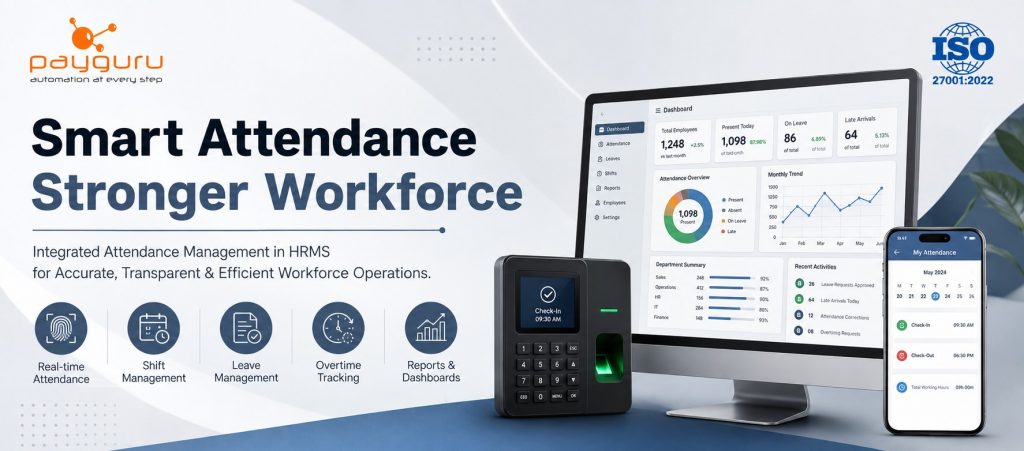
An Attendance Management System in HRMS is a digital solution that records employee attendance, working hours, shifts, leave, overtime, and related workforce information within a centralized human resource platform. Instead of maintaining attendance registers, spreadsheets, or disconnected systems, organizations can connect attendance data with employee records, leave management, payroll processes, and HR reporting.
For growing businesses, accurate employee attendance tracking is important because it can influence payroll calculations, leave balances, overtime processing, shift planning, workforce visibility, and compliance-related records. Modern systems can capture attendance through biometric devices, face recognition, RFID, web portals, or mobile-based methods, depending on the organization’s requirements.
The real value of integrating attendance with HRMS software is not simply replacing manual registers. It creates a consistent flow of workforce data from attendance capture to HR decisions. This helps HR teams spend less time reconciling records and more time managing people, policies, and workforce operations.
An Attendance Management System in HRMS is a software module or integrated platform used to record, process, monitor, and report employee attendance. It connects attendance events with employee profiles and HR rules so that working hours, absences, shifts, leave, and overtime can be managed from one place.
A typical HRMS attendance system may handle:
In an integrated human resource management system, attendance is not treated as an isolated activity. The system can connect attendance records with leave management, employee self-service, payroll, and workforce reporting.
The process usually follows a straightforward workflow.
Employees record their entry and exit using an approved method. Depending on the organization, this may include fingerprint or facial recognition devices, RFID cards, mobile attendance, or a web-based portal.
The captured records are transferred to the HRMS. A centralized attendance management software platform can consolidate information from multiple devices, departments, branches, or locations.
The system evaluates attendance according to configured policies. These rules may include shift timings, grace periods, weekly offs, holidays, overtime conditions, and absence rules.
Missing punches, unusual working hours, late arrivals, early departures, or other exceptions can be flagged for review.
Approved leave can be reflected in attendance records. This reduces the need for HR teams to manually compare separate registers and spreadsheets.
Processed attendance data can be used as an input for payroll, subject to the organization’s salary structure, attendance rules, and payroll policies.
HR and managers can review attendance summaries, employee records, department reports, shift information, overtime, leave, and other workforce data.
This workflow creates a connected HR process rather than a collection of separate administrative tasks.
A modern attendance management system can provide current attendance information to authorized HR users and managers. This is useful for organizations that need visibility across departments or multiple locations.
Real-time availability can help HR identify attendance gaps, monitor workforce presence, and respond to exceptions without waiting for manual reports.
Many organizations use biometric attendance systems to authenticate employees at entry and exit points. Fingerprint, facial recognition, RFID, and other device-based methods can be integrated with HRMS platforms.
Biometric integration can reduce dependence on handwritten registers and manual time entries. However, organizations should select technology based on their workforce, operating environment, privacy requirements, and business needs.
Shift-based organizations need more than simple in and out records. An employee attendance system should support different shift schedules, employee categories, weekly offs, holidays, and shift changes.
For example, a manufacturing company may have general, morning, evening, and night shifts. The HRMS can associate employees with their assigned shifts and evaluate attendance against the applicable schedule.
Attendance and leave are closely connected. When employees apply for leave, the request can be routed through an approval workflow. Once approved, the leave status can be reflected in the employee’s attendance record.
This reduces confusion between approved leave, absence, and missing attendance.
Organizations that operate beyond standard working hours may need to monitor overtime. An attendance tracking system can record additional working time and route overtime requests through defined approval rules.
Overtime should always be calculated according to the organization’s policies and applicable legal requirements.
Employee self-service gives employees controlled access to attendance-related functions. Depending on the HRMS configuration, employees may be able to:
This can reduce routine queries directed to HR and create a clearer process for attendance corrections.
Reports turn attendance records into information that HR and managers can use. Common reports include daily attendance, monthly attendance, absenteeism, late arrival, overtime, shift-wise attendance, department-wise attendance, and employee-wise summaries.
A centralized HR attendance software platform can also make it easier to export or share reports for operational and payroll processes.
The main advantage of integrating attendance with HRMS is data continuity. When attendance, employee records, leave, and payroll-related information are connected, HR teams do not have to maintain the same information across multiple disconnected systems.
Automated attendance capture can reduce errors associated with manual data entry and repetitive calculations. Accuracy still depends on correct configuration, device reliability, policy settings, and regular exception handling.
HR teams can spend significant time collecting attendance records, calculating working hours, checking leave, and preparing reports. Automation can reduce repetitive administrative tasks.
Attendance information often contributes to payroll inputs such as payable days, unpaid absence, overtime, and leave-related adjustments. Integration can reduce manual transfer of data between attendance and payroll systems.
Managers can access structured attendance information instead of relying on scattered spreadsheets. This can help them understand staffing availability, shift coverage, and attendance patterns.
A defined correction workflow gives employees and supervisors a formal way to resolve missing punches or incorrect attendance records. This improves transparency compared with informal changes to spreadsheets.
Employees can view their attendance and submit requests through self-service tools instead of repeatedly contacting HR for basic information.
An HR management system brings employee information, attendance, leave, and related HR processes into a common environment. This can make reporting and administration more consistent.
Manual attendance usually relies on registers, spreadsheets, or separate records maintained by HR or supervisors. It can work for very small teams with simple schedules, but it becomes harder to manage as employee numbers, shifts, locations, and policies increase.
An automated HRMS attendance management approach records attendance digitally, applies predefined rules, connects attendance with leave and other HR functions, and produces structured reports.
The difference is not simply digital versus paper. The more important distinction is whether attendance data can move through the organization’s HR workflow without repeated manual reconciliation.
For example, if an employee misses a punch, a manual process may require HR to receive a message, verify the actual attendance, edit a spreadsheet, update a leave or attendance record, and separately communicate the correction for payroll. An integrated system can provide a formal correction request and approval workflow, with the resulting record available to relevant HR processes.
An attendance management software solution can be useful across different industries.
Factories often manage multiple shifts, large workforces, overtime, and attendance across production areas. Integration with biometric devices can help centralize workforce attendance.
Organizations with flexible schedules, hybrid teams, or multiple locations can use attendance tools to maintain structured records while supporting different work policies.
Businesses with rotating shifts and varying staffing requirements can use shift and attendance management to monitor workforce availability.
Hospitals and healthcare facilities may operate around the clock, making shift planning and attendance tracking important operational functions.
Organizations with workers spread across sites may require mobile, biometric, or location-based attendance methods depending on their operating model.
Companies managing contract workers can connect attendance records with workforce management, compliance, billing, or payroll-related processes.
An automated attendance system can improve processes, but implementation requires careful planning.
If shift rules, grace periods, weekly offs, holidays, or overtime policies are configured incorrectly, automated calculations may also be incorrect. Policies should be reviewed before go-live.
Biometric devices and other attendance methods depend on reliable data synchronization. Organizations should consider offline scenarios, connectivity, device maintenance, and synchronization procedures.
Employees and supervisors need to understand how attendance is captured and how corrections or leave requests should be submitted. Clear communication and training can reduce confusion.
Attendance data is employee information and should be handled responsibly. Organizations should implement appropriate access controls, authentication, retention practices, and security measures based on their policies and applicable requirements.
Large organizations may have different rules for permanent employees, contract workers, trainees, shifts, locations, or departments. The selected system should support the required level of policy configuration.
Before selecting an HR attendance system, businesses should evaluate the following areas.
Check whether the system integrates with existing HRMS, payroll software, biometric devices, RFID systems, mobile applications, or other required platforms.
Make sure the system can handle your actual shift, leave, overtime, holiday, and attendance rules rather than forcing the organization into a rigid structure.
If your organization operates across branches, plants, offices, or sites, verify whether attendance can be managed centrally.
Look for features that allow employees to view attendance, apply leave, and submit correction requests without unnecessary HR intervention.
Check whether the system provides the reports required by HR, payroll, operations, and management.
Evaluate user roles, permissions, authentication, backups, data protection, and audit capabilities.
The solution should support the organization’s current workforce while allowing additional employees, departments, locations, and devices to be added as operations grow.
A successful implementation depends as much on process design as technology.
Start by documenting attendance policies before configuring the software. Define shifts, holidays, weekly offs, grace periods, leave rules, overtime conditions, and correction procedures.
Next, clean employee data before migration. Duplicate or incomplete employee records can create problems later.
Test attendance scenarios using real business cases. Include late arrivals, early departures, missing punches, overnight shifts, holidays, approved leave, overtime, and shift changes.
Define clear approval workflows. Employees, supervisors, HR, and payroll teams should know who is responsible for each type of attendance correction or approval.
Train employees before the system becomes mandatory. Explain how to record attendance, view records, apply leave, and request corrections.
Finally, review reports after implementation. Compare system-generated records with expected outcomes and correct configuration issues before relying on the system for payroll processing.
PayGURU provides HR and workforce management solutions that connect attendance with broader HR operations. Its HRMS software supports real-time attendance integration with biometric, face recognition, and RFID devices, along with attendance and leave workflows and reporting capabilities.
Its Time and Attendance solution supports biometric device integration, shift scheduling, leave and overtime management, employee self-service, attendance reporting, and multi-location workforce management.
Organizations looking for broader information about HR processes can also explore PayGURU’s HRMS software guide and cloud-based HRMS guide, which cover employee management, attendance, leave, payroll readiness, reporting, and related HR workflows.
These capabilities can be useful for organizations that want attendance data to become part of a connected HR process rather than remain a separate administrative record.
Attendance management is no longer limited to recording when an employee enters or leaves the workplace. In a modern HR environment, attendance data can influence leave administration, overtime management, payroll preparation, workforce planning, and management reporting.
An integrated HRMS attendance system provides a structured way to capture attendance, apply organizational policies, manage exceptions, and connect workforce information across HR processes. The result is a more consistent and transparent approach to attendance management.
Businesses evaluating an attendance solution should look beyond basic punch-in and punch-out functionality. Integration, policy flexibility, employee self-service, reporting, security, device compatibility, and scalability are equally important.
If your organization is planning to automate attendance and connect it with broader HR operations, explore the PayGURU HRMS and Time and Attendance solution or speak with the PayGURU team about your requirements.
An Attendance Management System in HRMS is a digital module that records and manages employee attendance, working hours, shifts, leave, overtime, and attendance exceptions. It connects this information with other HR processes.
Attendance data is captured through devices or digital methods, synchronized with the HRMS, processed according to configured rules, and then used for leave management, reporting, and payroll-related workflows.
Yes. Many HRMS and attendance platforms can integrate with biometric devices such as fingerprint and facial recognition systems. Compatibility should be checked before implementation.
Attendance software focuses primarily on recording and managing employee attendance. HRMS covers a wider range of HR functions and may include employee records, attendance, leave, payroll, compliance, workflows, and reporting in one platform.
Yes, depending on the system. Businesses with multiple branches, plants, departments, or shifts should choose an HRMS that supports multi-location structures and configurable shift policies.
Attendance records can provide payroll inputs such as payable days, absence, overtime, and other attendance-related adjustments. Integration reduces the need to manually transfer attendance information into payroll processes.
Employee self-service can be valuable because employees can view attendance, check shifts, apply for leave, and submit correction requests through a defined process. This can reduce routine HR queries and improve transparency.
Businesses should evaluate device integration, HRMS and payroll integration, shift and leave rules, multi-location support, employee self-service, reporting, security, scalability, implementation support, and overall ease of use.