A visitor management system is a digital solution that helps organizations register, verify, approve, track, and manage people



 By Pay GURU
August 21, 2026
By Pay GURU
August 21, 2026
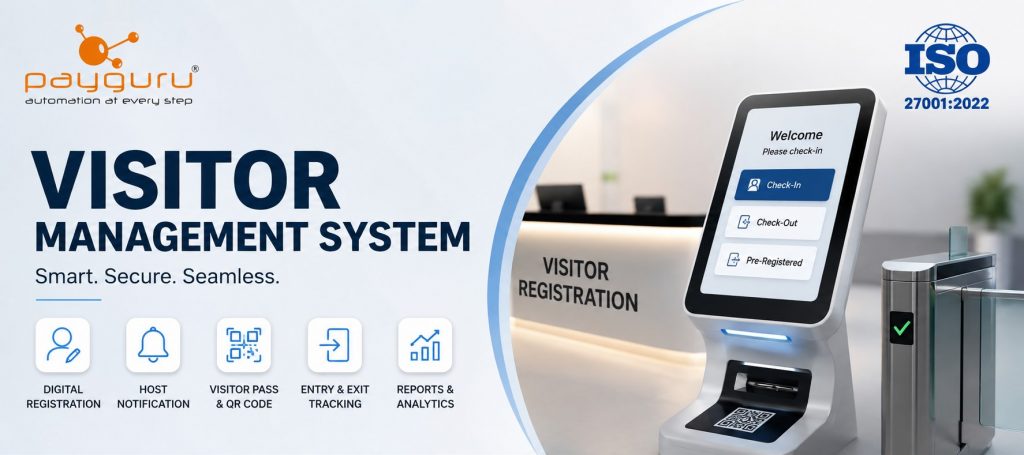
A visitor management system is a digital solution that helps organizations register, verify, approve, track, and manage people entering and leaving their premises. Instead of relying on paper registers or disconnected spreadsheets, businesses can use visitor management software to record visitor information, notify hosts, issue temporary passes, monitor entry and exit, and maintain searchable visit records.
For offices, factories, hospitals, educational institutions, warehouses, residential communities, and other controlled environments, visitor management is closely connected with physical security and daily operations. A well-designed system can make reception and security processes more organized while giving authorized teams better visibility of who is on-site.
Modern businesses increasingly need more than a simple visitor logbook. They need a structured process that balances workplace security, visitor convenience, operational efficiency, and responsible handling of personal information.
This guide explains what a visitor management system is, how it works, its key features and benefits, common use cases, implementation challenges, and the factors businesses should consider before selecting a solution.
A visitor management system is software that automates the process of registering, screening, authorizing, monitoring, and recording visitors at a physical location. It creates a digital record of visits and can connect reception, security, employees, access control equipment, and administrators through a defined workflow.
A typical visitor management process may include:
The exact workflow depends on the organization’s security policies and the capabilities of the selected visitor management software.
For businesses evaluating a digital solution, PayGURU provides a dedicated Visitor Management System designed to support digital visitor tracking and workplace security workflows.
Although implementations differ, the basic workflow is straightforward.
A visitor provides required information such as name, mobile number, organization, purpose of visit, host name, and expected duration. Depending on the environment, the system may also capture identification details or photographs when required by organizational policies.
The system can route the visit to the appropriate employee, reception team, or security personnel for approval. Pre-registered visitors may already have their information available before arriving at the premises.
The host can receive a notification when a visitor arrives. This reduces the need for reception staff to locate employees manually and creates a clear handoff between reception and the host.
Once approved, the visitor can receive a temporary pass or badge. Depending on the system, this may be a printed gate pass, QR-based pass, or another temporary credential.
The system records when the visitor enters and leaves the premises. This creates a current view of visitor activity and maintains historical visit records for authorized users.
Authorized administrators can review visit history, generate reports, and monitor visitor activity according to organizational requirements. This can support security reviews, audits, and operational planning.
A visitor management system can range from a simple digital registration platform to a broader workplace security solution. Common features include the following.
Digital registration replaces handwritten visitor logs with structured electronic records. This improves readability, searchability, and consistency of data capture.
Employees can register expected visitors before their arrival. Visitor pre-registration can reduce reception workload and make scheduled meetings easier to manage.
Approval workflows help organizations define who can authorize different types of visitors. This is particularly useful when access to specific departments, floors, laboratories, production areas, or restricted zones must be controlled.
Some visitor management software can generate temporary QR codes or digital passes for approved visitors. The validity period and access rules should be configured according to the site’s security policy.
Email, SMS, or system notifications can inform employees when their visitors arrive. Notification options vary by platform.
Organizations may capture identification information or visitor photographs when appropriate and permitted by their policies and applicable privacy requirements.
Recording both entry and exit helps maintain an accurate visitor log and can support emergency preparedness and security monitoring.
Some platforms allow authorized administrators to flag individuals or organizations that require additional review before admission. PayGURU describes an optional blacklisting feature for companies, individuals, and employee visits.
Digital or printed visitor gate passes can contain visitor details and approved material information. PayGURU also describes email and SMS delivery options for visitor passes and support for multi-day passes.
Reports can help organizations review visitor volumes, visit history, entry and exit activity, and other operational information. The most useful reports depend on the organization’s security and management requirements.
Implementing a visitor management system for businesses can provide benefits beyond simply replacing a paper register.
A digital system gives authorized personnel a structured record of visitors and their current visit status. This is useful when security teams need to know who has entered a facility.
Digital registration and pre-registration can reduce repetitive manual data entry. When visitor information is already available, reception staff can focus on verification and assistance rather than rewriting details.
Visitor approval, temporary passes, access rules, and entry and exit records can create stronger controls around physical access. A visitor management system should complement, rather than replace, broader security procedures.
A clear check-in process can create a more professional arrival experience. Visitors can be guided through registration, verification, host notification, and pass issuance without unnecessary confusion.
Digital records are easier to search, filter, and organize than paper registers. Authorized users can retrieve information when needed for operational or security purposes.
Automated notifications, pre-registration, digital passes, and reporting can reduce repetitive tasks for reception and security teams.
A current visitor record can help security and emergency teams understand who may be present on-site. This should form part of a broader emergency response procedure rather than being treated as the only source of information.
More advanced visitor management software can connect with access control, biometric devices, turnstiles, CCTV, employee directories, or workplace systems. Integration can reduce duplicate data entry and support coordinated security workflows.
PayGURU’s broader solution portfolio includes visitor management alongside attendance, access control, biometric devices, barriers, turnstiles, and surveillance-related products.
A manual visitor register may be adequate for a small site with limited visitor traffic and straightforward security requirements. However, it can become difficult to manage as visitor volumes, locations, compliance requirements, and security expectations increase.
With a manual register, reception staff generally write visitor information by hand and depend on separate processes for notifying hosts, issuing badges, and tracking exits. Finding historical information can also require considerable manual effort.
With a digital visitor management system, registration, approval, notifications, pass issuance, entry and exit records, and reporting can be handled through a connected workflow.
The important point is that digital systems are not automatically suitable for every organization. Businesses should evaluate visitor volume, risk level, site layout, privacy requirements, existing security infrastructure, and budget before deciding.
Visitor management systems are relevant anywhere an organization needs controlled or documented access by non-employees.
Companies can manage clients, candidates, vendors, consultants, interviewees, and other guests while keeping reception and security workflows organized.
Factories may need to manage vendors, contractors, drivers, customers, and service personnel while applying different access rules to production and restricted areas.
Healthcare environments may have different visitor rules for patients, attendants, vendors, and service providers. A digital workflow can help staff apply defined registration and access procedures.
Schools, colleges, and universities can use visitor management software to manage parents, vendors, contractors, guests, and event visitors.
Warehouses often receive drivers, transport partners, suppliers, and contractors. Visitor tracking software can help create a consistent process for arrival, verification, and departure.
Residential properties can use visitor management to register guests, service providers, delivery personnel, and other temporary visitors according to community policies.
Visitor management and access control are related, but they solve different parts of the security process.
A visitor management system primarily manages the visitor lifecycle: registration, approval, identification, host notification, pass issuance, and visit records.
An access control system determines whether a person can physically pass through a controlled point, such as a door, turnstile, or gate, using an authorized credential.
For example, a visitor may register through visitor management software and receive a temporary credential. The access control system can then enforce the physical entry rule at a designated door or gate.
When these systems are integrated, businesses can create a more coordinated visitor access control workflow.
Choosing visitor management software should begin with business and security requirements rather than a feature checklist alone.
Identify who visits the premises and why. Consider customers, vendors, contractors, candidates, delivery personnel, service engineers, and recurring visitors.
Document the process from arrival to departure. Determine where registration happens, who approves visits, how hosts are notified, how badges are issued, and how exits are recorded.
If the organization already uses access control, biometric attendance, CCTV, turnstiles, employee directories, or other security systems, confirm whether the visitor platform can integrate with the required infrastructure.
Visitor records can contain personal information. Review access permissions, data retention, authentication, encryption, audit logs, and other controls offered by the provider. Organizations should ensure implementation follows applicable privacy and security requirements.
Businesses operating across branches or cities may need centralized reporting, location-based permissions, and consistent visitor policies. PayGURU states that its visitor management platform supports multi-branch and multi-city deployments with centralized reporting and role-based access.
Consider whether the system should be cloud-based, on-premise, or supported through a combination of deployment options. Businesses operating in factories, warehouses, remote sites, or large campuses should understand offline capabilities before selecting a platform. PayGURU states that its visitor management system supports offline-first operation for essential processes and synchronization after connectivity is restored.
The solution should accommodate changes in visitor volume, sites, users, security policies, and integration requirements. Evaluate onboarding, training, technical support, maintenance, and upgrade processes before implementation.
Technology alone does not create an effective visitor process. Businesses should combine software with clear policies and trained personnel.
Businesses may face several challenges when moving from manual processes to a digital visitor management system.
Reception and security teams may initially prefer familiar paper-based processes. Training and a simple user interface can make adoption easier.
Connecting visitor management with existing access control or security infrastructure may require technical planning, compatible hardware, and clearly defined data flows.
Visitor information should be collected, stored, accessed, and retained responsibly. Businesses should establish clear policies before deploying features such as ID scanning, photographs, or watchlists.
If different branches follow different visitor procedures, centralized software alone may not solve the underlying process issue. Organizations should define common policies while allowing necessary site-specific controls.
Some systems depend heavily on continuous connectivity. Businesses operating in factories, warehouses, remote sites, or large campuses should understand offline capabilities and recovery procedures before selecting a platform.
For organizations with regular external visitors, multiple access points, security requirements, or a growing number of sites, a visitor management system can provide meaningful operational value. It can centralize visitor records, standardize registration, improve visibility, and connect visitor workflows with physical security controls.
However, the right solution depends on the organization’s requirements. A small office may need only digital registration and host notifications, while a manufacturing campus may require visitor pre-registration, contractor workflows, access control integration, gate passes, multi-site reporting, and stronger security controls.
The objective should be to choose a system that fits the organization’s actual visitor journey rather than purchasing features that will not be used.
A visitor management system is software used to register, verify, approve, track, and manage visitors entering and leaving a physical facility. It replaces or improves manual visitor registers through digital workflows and centralized records.
Common features include digital visitor registration, pre-registration, host notifications, visitor approval, ID or photo capture, QR codes, temporary badges, entry and exit tracking, reporting, and integration with access control systems.
It creates structured visitor records, supports approval workflows, enables temporary credentials, and can connect with access control infrastructure. These controls help organizations manage visitor access more consistently.
Yes. Many visitor management platforms can integrate with access control systems, turnstiles, gates, biometric devices, or other security infrastructure. Integration capabilities vary by provider and hardware environment.
Yes. Small businesses can use visitor management software for basic registration, host notifications, visitor badges, and visit records. The appropriate feature set depends on visitor volume and security requirements.
Some enterprise visitor management systems support multiple branches or sites through centralized administration, reporting, and role-based permissions. Businesses should verify multi-location capabilities before selecting a solution.
The system should collect only information necessary for the defined business and security purpose. Depending on the organization, this may include visitor name, contact details, host, visit purpose, arrival time, departure time, and approved identification information.
A visitor management system provides a structured way for businesses to control and document visitor access while improving the experience at reception and security checkpoints. By replacing fragmented manual processes with digital registration, approval, notifications, temporary passes, entry and exit tracking, and reporting, organizations can gain better operational visibility.
The best results come from combining the right technology with clear visitor policies, trained staff, appropriate access controls, and responsible data practices. Before selecting visitor management software, businesses should assess visitor types, locations, security requirements, integration needs, privacy obligations, and future growth.
PayGURU provides visitor management as part of its broader workplace automation and security solutions. Its visitor management offering includes digital registration and tracking capabilities, gate pass workflows, notifications, blacklisting options, and integration-oriented features.
For businesses evaluating workplace automation and security solutions, the PayGURU homepage provides an overview of its software, hardware, access control, attendance, payroll, and visitor management solutions.
For organizations considering integrated physical security, PayGURU also provides access control solutions covering controlled access requirements for business premises.
To discuss visitor management requirements for your organization, use the PayGURU contact page and speak with the team about the workflow, integrations, and deployment approach that best fits your workplace.