Managing employee working hours accurately is a fundamental part of effective workforce management. Yet many organizations still

 By Pay GURU
August 19, 2026
By Pay GURU
August 19, 2026
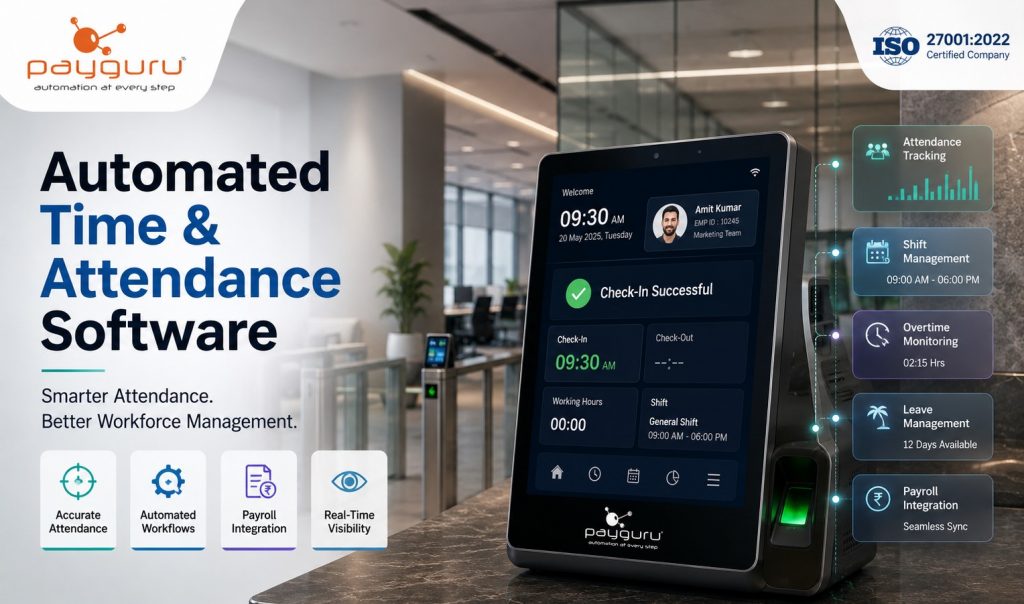
Managing employee working hours accurately is a fundamental part of effective workforce management. Yet many organizations still depend on spreadsheets, manual registers, disconnected biometric devices, or repetitive HR processes to record attendance. These approaches can become difficult to manage as teams grow, work shifts change, and employees operate across multiple locations.
Automated time and attendance software provides a more structured approach. It digitally records employee attendance, working hours, shifts, leave, overtime, and related information while reducing repetitive administrative work. When integrated with HRMS software, payroll software, and biometric attendance systems, attendance information can flow into other HR processes with less manual intervention.
For modern businesses, the value of automated attendance management goes beyond simply recording whether an employee is present or absent. It can improve data accuracy, provide better workforce visibility, simplify payroll preparation, support employee self-service, and help HR teams manage complex attendance policies more efficiently.
This article explains the major benefits of automated time and attendance software, its essential features, practical use cases, implementation considerations, and how businesses can select an appropriate solution.
Automated time and attendance software is a digital system used to record, manage, and analyze employee attendance and working-time information.
Depending on the solution and business requirements, employees may record attendance through biometric devices, RFID, facial recognition, web-based systems, mobile applications, or other supported attendance methods.
The software can then process information such as:
PayGURU’s Time and Attendance solution is designed around automated attendance tracking, biometric integration, shift management, leave and overtime management, employee self-service, and reporting capabilities.
Manual attendance management becomes increasingly difficult when an organization has multiple departments, shifts, locations, employment categories, or attendance policies.
A spreadsheet may be sufficient for a very small team, but larger workforces often require more structured controls.
Common challenges include:
An automated employee attendance management system addresses these challenges by centralizing attendance information and applying predefined rules to attendance data.
One of the primary advantages of an automated attendance system is improved consistency in recording employee time.
Instead of relying on handwritten registers or manually updated spreadsheets, attendance can be captured directly through connected attendance devices or digital interfaces.
For example, a biometric device can record an employee’s attendance and synchronize the information with the attendance management platform.
This creates a more reliable digital record that HR teams can review when handling:
Accuracy still depends on appropriate system configuration, device reliability, organizational policies, and proper data management. Automation reduces manual intervention, but it does not eliminate the need for effective administration.
Attendance administration can involve considerable repetitive activity.
HR personnel may otherwise need to collect attendance records, verify them, calculate working hours, check leave records, identify missing punches, prepare reports, and send information to payroll.
Attendance automation software can streamline many of these activities.
Instead of manually consolidating information from multiple sources, HR teams can work from a centralized system.
This allows HR professionals to spend more time on activities such as:
The objective is not to remove the HR function. It is to reduce unnecessary administrative workload so HR teams can focus on higher-value responsibilities.
Organizations operating multiple shifts often face more complicated attendance requirements than businesses with standard working hours.
A modern time and attendance management system can support different shift schedules according to organizational policies.
This can be particularly useful for:
PayGURU’s attendance solution supports shift schedules for different employee categories and provides workflows for attendance-related processes such as leave, overtime, missing punches, and corrections.
Attendance and payroll are closely connected.
Working hours, overtime, leave, absences, and other attendance-related information can influence payroll calculations depending on company policy.
When attendance information is maintained manually, HR and payroll teams may need to transfer information between systems or spreadsheets.
An integrated attendance and payroll system can reduce this duplication by allowing relevant attendance information to flow into payroll processes.
PayGURU’s payroll solution includes attendance-related employee services such as attendance validation, missing-punch or time-correction requests, shift schedules, and attendance reports.
For businesses, the important consideration is not simply whether attendance and payroll exist in the same software. The system should have clearly defined rules and integration workflows that match the organization’s payroll policies.
Managers need timely information to understand workforce availability.
Automated systems can provide dashboards and reports that make it easier to review attendance patterns and workforce information.
Depending on the software, managers may be able to review:
PayGURU states that its HRMS provides real-time attendance information through integration with biometric, face-recognition, and RFID devices, along with live attendance dashboards.
This type of visibility can support faster operational decisions, particularly in organizations where workforce availability directly affects daily operations.
Modern employee attendance software does not necessarily require employees to depend entirely on HR for routine attendance-related requests.
An employee self-service feature can allow employees to:
PayGURU’s platform includes employee self-service functionality for attendance validation, leave applications, missing-punch requests, shift schedules, and related workflows.
This can improve transparency because employees can review their own records and follow established approval processes.
Overtime can become difficult to manage when working hours are recorded manually.
An automated time tracking system can help organizations identify overtime based on configured working schedules and attendance rules.
HR teams can then review overtime information before it is approved or used for payroll processing.
However, overtime rules vary between organizations and jurisdictions. Businesses should configure the software according to applicable laws, employment agreements, and internal policies rather than assuming that a generic overtime calculation is appropriate.
Attendance data becomes more valuable when organizations can turn it into usable reports.
Automated attendance tracking software can generate reports covering different workforce dimensions.
Examples include:
PayGURU’s Time and Attendance solution describes flexible reporting, dashboards, multiple file formats, scheduled email reports, and support for several Indian languages.
Better reporting can help management identify recurring operational issues and make decisions based on recorded workforce information.
Managing attendance becomes more complex when employees work across multiple branches, plants, offices, or project locations.
A centralized workforce management system can provide a common framework for attendance policies while allowing organizations to manage different locations and employee groups.
PayGURU’s HRMS supports multiple companies, locations, and departments through a centralized platform.
This can be particularly useful for organizations that need consolidated visibility without maintaining completely separate attendance processes for every location.
A well-configured digital attendance management system can establish clearer processes for attendance corrections, leave approvals, overtime approvals, and shift changes.
For example, if an employee forgets to record a punch, the employee can submit a correction request rather than relying on an informal verbal process.
A defined workflow can then route the request to the appropriate authority for review.
This creates greater visibility around attendance changes and can help establish accountability for both employees and managers.
The difference between manual and automated attendance management is primarily the way attendance information is captured, processed, reviewed, and reported.
With manual tracking, HR teams may collect attendance information from registers, spreadsheets, emails, or separate devices and then consolidate it.
With an automated attendance management system, attendance can be captured digitally and processed according to configured organizational rules.
Automation is particularly valuable when a business has:
For a very small organization with simple working schedules, manual tracking may still be workable. The right choice depends on workforce size, operational complexity, budget, and the level of automation required.
Businesses should evaluate functionality rather than choosing software based only on the number of features advertised.
Important capabilities may include:
Look for support for relevant biometric attendance systems, RFID, facial recognition, or other devices used by the organization.
The software should support different shifts, schedules, employee categories, and organizational rules.
Attendance should connect logically with leave and overtime processes.
Employees should be able to view attendance and submit appropriate requests without unnecessary HR intervention.
The system should support reliable transfer or integration of attendance information required for payroll.
Reports should provide useful operational information rather than simply generating large volumes of raw data.
Different users should have appropriate permissions based on their responsibilities.
Organizations with several offices, plants, branches, or sites should assess whether the system can manage their structure effectively.
Because attendance information is employee-related data, organizations should assess authentication, access controls, data protection, backups, and vendor security practices.
Factories often operate multiple shifts and may have large workforces. Automated attendance can simplify shift tracking, overtime management, and workforce visibility.
Office-based organizations can use automated attendance systems to manage working hours, leave, corrections, and employee self-service.
Retail businesses with multiple branches can use centralized attendance management to monitor employee schedules and attendance across locations.
Hospitals and healthcare organizations often operate around-the-clock schedules. Structured shift and attendance management can support workforce administration.
Organizations with employees working across project locations may benefit from centralized attendance records and location-specific workforce management.
Organizations managing contract workers may need attendance information for workforce verification, payroll, billing, and compliance-related processes.
PayGURU’s Contract Labour Management System combines attendance, biometric integration, worker records, payroll and billing workflows, and compliance-related functionality for contract workforce management.
Automation can deliver significant operational value, but implementation should be planned carefully.
Incorrect shift rules, overtime settings, leave policies, or approval workflows can produce inaccurate results.
Employees and managers need clear guidance on how to use attendance devices, applications, correction workflows, and self-service functions.
Biometric or attendance devices need to communicate correctly with the software.
Organizations moving from spreadsheets or legacy systems should carefully validate employee records and historical data where required.
Attendance information should be handled responsibly, with appropriate access controls and data protection practices.
Technology alone does not solve process problems. Organizations should define attendance policies and responsibilities before automating them.
A practical implementation approach includes:
The goal should be to automate a well-defined process rather than simply digitizing an inefficient one.
Before selecting time and attendance software, decision-makers should ask several practical questions.
Does it support the organization’s workforce size?
Can it handle multiple locations and shifts?
Does it integrate with existing biometric devices?
Can attendance data connect with payroll?
Does it support employee self-service?
Can workflows be configured according to company policies?
Are reports useful for HR and management?
How is employee data protected?
What implementation and technical support does the vendor provide?
Is the system scalable as the business grows?
Organizations should also request a demonstration using realistic scenarios. For example, test a night shift, missing punch, overtime request, leave adjustment, employee transfer, and payroll integration before making a final decision.
Automated time and attendance software digitally records and manages employee attendance, working hours, shifts, leave, overtime, and related information. It can integrate with biometric devices and other HR systems.
The major benefits include improved attendance accuracy, reduced administrative work, better workforce visibility, simplified shift management, employee self-service, faster reporting, and easier integration with payroll processes.
Yes. Many modern systems support integration with biometric devices, RFID, facial recognition systems, and other attendance technologies. Compatibility should be verified before implementation.
Attendance software can provide payroll with relevant information such as working hours, approved overtime, leave, and attendance-related deductions according to configured business rules. Integration reduces the need for repeated manual data entry.
Yes. Small businesses can benefit when manual attendance processes begin consuming significant administrative time or when they need better payroll, leave, shift, or employee record management. The appropriate solution should match the organization’s size and complexity.
Many systems provide employee self-service, allowing employees to review attendance, apply for leave, request corrections, and access shift information. The exact functionality depends on the software.
Businesses should evaluate device integration, shift management, payroll integration, employee self-service, reporting, security, scalability, workflows, ease of use, implementation support, and compatibility with existing HR processes.
Automated time and attendance software has become an important component of modern workforce management because accurate attendance information affects much more than employee presence. It can influence payroll preparation, overtime, leave administration, workforce planning, reporting, and day-to-day operational visibility.
The strongest solutions connect attendance with broader HRMS, payroll, employee self-service, biometric devices, and workforce management processes. However, technology should support clearly defined policies rather than replace them. Businesses should therefore evaluate their workforce structure, attendance rules, integration requirements, security needs, and future growth before selecting a platform.
For organizations looking to replace fragmented attendance processes with a centralized digital approach, PayGURU provides Time and Attendance, HRMS, payroll, and workforce management solutions designed to support different business requirements.
Explore PayGURU’s Time and Attendance Solution to learn how automated attendance management can support more efficient workforce operations.